


What’s New in OpenBridge Designer CONNECT Edition 10.08.01 - Date: May, 2020
With this improvement, users will be able to analyze and design cable-stayed and suspension bridges, in addition to all types of bridges (complex or everyday). Also, it brings some complex analysis features such as advanced hydrodynamic analysis, wind CFD and buffeting analysis, and specialized tools for advanced construction methods
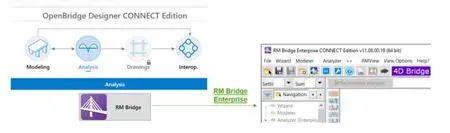
New File Format (.obdx)
Below please find the highlights of the changes with new file format (.obdx) and comparison with old file format (.obd):
• .obdx file includes all analytical components (.lbcx, .lbsx or RM folder) files within its database. In other words, there will not be any external analytical component files referenced in OBD, unlike .obd files in which no analytical files are stored but OBD reference to external analytical files.
… In Standalone Workflow, if a file is sent from OpenBridge Modeler to analytical components, analytical component file will be stored in .obdx and an entry under the same “Standalone Group” is generated, automatically.
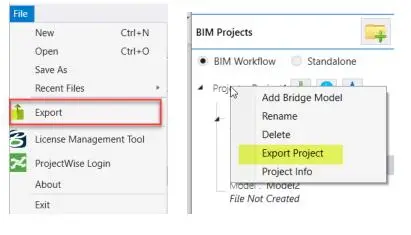
• At any time, user may choose to export all analytical component files (and dgn files) at a directory in local drive user selects, therefore those analytical component files can be shared with other users possessing standalone licenses of analytical components.
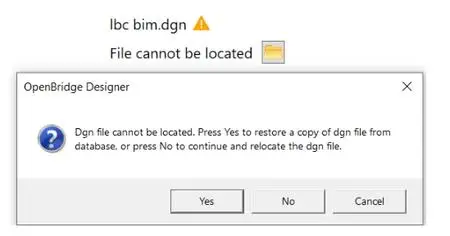
• dgn files will stay as external files referenced in OBD, similar to old file format, however, .obdx file will store the most up-to-date copy of the dgn file. In case the external dgn file cannot be located, user will be asked if the dgn file should be restored from .obdx database.
• new file format (.obdx) is, now, compatible with ProjectWise for all component files including analytical files. In the old file format, the analytical files couldn’t be placed/referenced in a ProjectWise directory and they needed to be in a local drive to be referenced by OBD.
Bridge Wizard
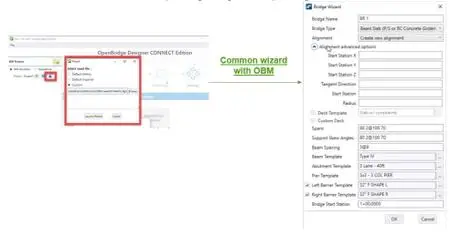
• Creating a bridge model in OpenBridge is now a few clicks away
• Bridge wizard is developed to start bridge models quickly and efficiently
• It is a common wizard between OpenBridge Designer and OpenBridge Modeler for users’ convenience
With OpenBridge Designer, you have the advantage of using a single comprehensive package from beginning to end of any bridge design project. You can use one product to create an interoperable physical and analytical model for both steel and concrete bridges that can be utilized throughout the lifecycle of the bridge. OpenBridge Designer uses bridge information modelling (BrIM), the advanced methodology for the bridge design and construction industry.
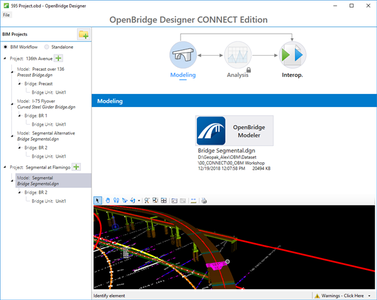
Beginning with this release (10.06), OpenBridge Designer introduces a completely new interface designed to streamline the interoperability between the physical and analytical modeling of bridge structures. The new dashboard offers two workflows: a BIM Workflow, which guides the user through the typical interoperable BIM steps, and a Standalone Workflow meant to support independent, non-interoperable work with any of OpenBridge Designer’s components.
BIM Workflow
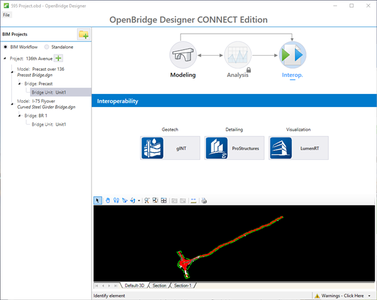
Working in a BIM workflow provides users who create multiple projects (which can contain multiple types of bridges) with a significant advantage, having the ability to access overall project information in one central file format, the new OpenBridge Designer file format. The OpenBridge Designer file manages DGN information and its internal connectivity with Bentley’s LEAP Concrete or Steel solutions. Providing true BIM interoperability, OpenBridge Designer provides access to the geotechnical, detailing and visualization disciplines via gINT, ProStructures and LumenRT respectively.
Standalone Workflow
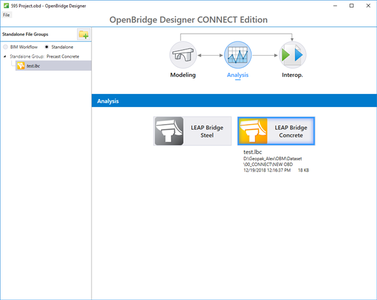
Using the Standalone workflow, the user has the option to work independently with OpenBridge Modeler, LEAP Bridge Concrete or LEAP Bridge Steel. Later, if the project progresses, the user can easily create a new project and incorporate the previously created models into a new BIM Workflow in OpenBridge Designer.
Details
| Software Title | OpenBridge Designer CONNECT Edition Update 8.1 |
| Size | 4.1 GB |
| Download Method | Direct Download |
| Download Links | BECOME A MEMBER VIEW DOWNLOAD LINKS |
The post OpenBridge Designer CONNECT Edition Update 8.1 appeared first on Civil Engineering Community.
source https://www.civilax.com/openbridge-designer-connect-edition-update-8-1/


